UNINET® Blog
| TRANSFER NEWS
Best IColor Printer for Waterslide Decals
A comparison of each IColor model for use creating waterslide decals

Waterslide decal printing presents a unique challenge—especially when producing full-color graphics for black, clear, or other dark substrates. A standard printer may deliver excellent results for general transfer applications but still lack the white opacity, color density, and fine-detail reproduction needed for demanding waterslide work.
While the Alps Microdry printers were a good solution in the past, these machines are no longer supported, so most decal printers have turned to the innovative UNINET® IColor White Toner Transfer Printer line.
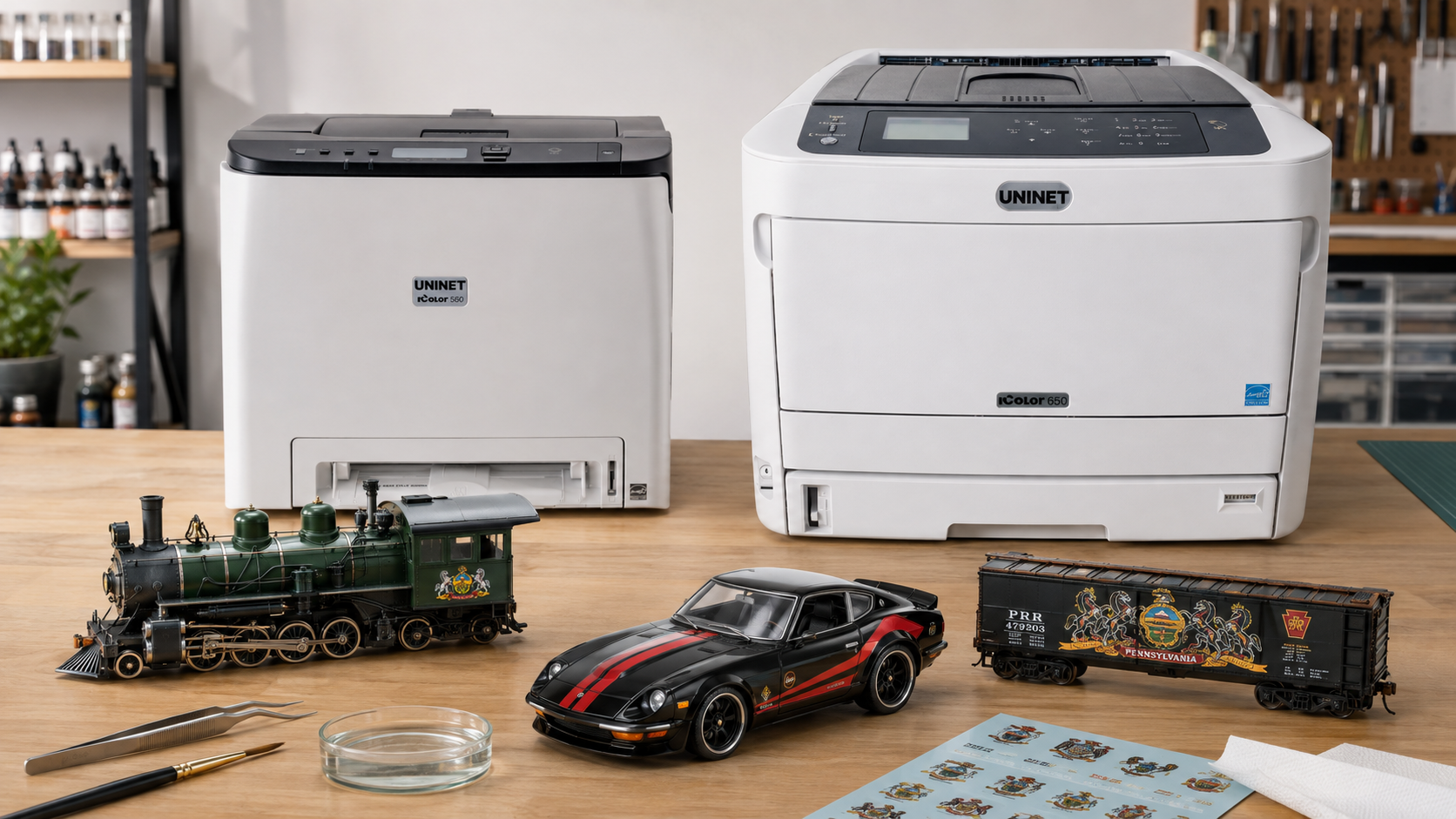
So, which IColor printer is the best choice for waterslide decals? For professional white-underprint applications, the IColor™ 650 is our top recommendation. The IColor™ 500 is an excellent lower-cost alternative when available, while the IColor™ 340/540/560 Series is better suited to lighter-duty waterslide applications and customers who need a more versatile, multipurpose transfer printer.
Why White Underprinting Matters
Most color toner is partially transparent. When a decal is placed on a dark or clear surface, the color of that surface can show through the printed image, making the design appear dull or washed out.
White-underprint technology places a white layer beneath the color image. This white base helps isolate the printed colors from the substrate and improves brightness, contrast, and overall vibrancy.
However, simply adding more white is not always the answer. The color toner printed over the white must be sufficiently opaque. If too much white is placed beneath a less-opaque color layer, the white can begin to show—or “blast”—through the color. The best waterslide results therefore depend on the balance between white density and color opacity.
Best Overall Choice: IColor™ 650
The IColor™ 650 is the strongest IColor printer solution for waterslide decals that require a white underbase. Compared with the IColor™ 340/540/560 Series, it offers the following:
- * Higher print resolution
- * Better color reproduction and color matching
- * More opaque color toner
- * Greater control over white-underbase density
- * More vibrant results on black, clear, and dark-colored substrates
- * Tabloid-size printing for larger decals and more efficient sheet layouts
Because the IColor 650’s color toner is more opaque, the printer can support a stronger white underbase without as much white showing through the color layer. This is particularly important for decals applied to black or clear surfaces, where opacity and color density make the greatest visual difference.
For customers producing professional waterslide decals—or customers accustomed to the output of discontinued ALPS printers—the IColor 650 is generally the closest practical option within the IColor line.
Watch our video explaining white-underprint opacity and the IColor 650.
Budget-Friendly Alternative: IColor™ 500
For customers whose budget does not allow for the IColor 650, the IColor 500 can be an excellent waterslide printer when units are available (this model is discontinued, so it is in short supply). It is a letter-size model and offers stronger white-underprint performance than the IColor 340/540/560 Series without requiring a different toner formulation.
The IColor 500 has lower resolution and a smaller maximum print size than the IColor 650, but it can still produce vibrant decals with a relatively strong white base. This makes it a compelling option for customers who primarily print letter-size waterslide sheets and prioritize opacity over maximum resolution or tabloid-size output.
See waterslide printing demonstrated by an IColor 500 user.
Is the IColor™ 340/540/560 Series Good for Waterslide Decals?
The IColor 340/540/560 Series can produce good waterslide decals and remains an attractive choice for customers who want a versatile printer for multiple transfer applications. However, it is not our first choice for demanding white-underprint work on black or clear substrates.
The standard color toner used in these models is less opaque than the toner used in the IColor™ 650. As a result, there is a practical limit to how much the white underbase can be increased before it begins to show through the colors above it.
For compatible models and applications, a glossy toner kit will improve color density and allow a somewhat stronger white underbase when printing onto paper or synthetic media. This can improve waterslide output, but it still does not equal the resolution, color opacity, or overall underprint performance of the IColor 650. That said, the 340/540/560 series does a GREAT job printing solid white graphics. It’s also an excellent choice for printing decals for us on light surfaces (where you are using minimal white underprint)
The IColor 340/540/560 Series may still be the right choice when:
- * Most decals will be applied to white or light-colored surfaces
- * Maximum white opacity is not required
- * Waterslide printing is only one of several intended applications
- * Budget, printer size, or portability is more important than premium waterslide performance

Important Expectations About Opacity
No current printer produces a 100% completely opaque white layer
Our testing has produced the most consistent results on smooth, uniformly colored surfaces, including solid black and clear substrates. Results can be less predictable on surfaces with multiple colors, uneven coloration, texture, or strong contrast beneath the decal. The white layer may not be opaque enough to completely conceal those variations.
Some users improve coverage by applying a second white layer. This can help, but it also adds steps to the process and does not guarantee complete opacity in every application. Testing the complete workflow—including the media, printer settings, coating, substrate, and finishing process—is essential before beginning production.
Which IColor Printer Should You Choose?
| Model | Best For | Key Considerations |
| IColor™ 650 | Professional waterslide decals, dark and clear substrates, larger sheets | Best resolution, color density, white-underbase control, and overall waterslide performance |
| IColor™ 500 | Budget-conscious waterslide specialists using letter-size media | Strong vibrancy and underprint performance, but lower resolution and smaller output than the 650; availability may be limited |
| IColor™ 340/540/560 Series | General-purpose transfer printing and waterslide decals on lighter substrates | Versatile and capable, but offers less color opacity and a lower practical white-underbase limit |
Our Recommendation
If waterslide decals are your primary application—particularly decals intended for black, clear, or dark substrates—the IColor™ 650 is the best overall choice. Its higher resolution, more opaque color toner, and stronger white-underprint capability deliver the most vibrant and consistent results in the IColor range.
If you primarily need letter-size output and want to reduce your initial investment, the IColor™ 500 is a strong alternative when available. The IColor™ 340/540/560 Series remains a good multipurpose option, but customers with demanding opacity requirements should understand its limitations before choosing it specifically for waterslide production.
Every waterslide application is different. Before selecting a printer, consider the color and consistency of the intended substrate, the required print size, the desired opacity, the production volume, and whether the printer will also be used for other transfer applications.
Contact your IColor dealer or UNINET® directly to discuss your specific waterslide application, and they can help determine which IColor printer best matches your substrates, quality expectations, and budget.